
Herramienta de video con IA

Remove Subtitles from Video — Free AI Tool, No Crop Needed online con IA

Sube tu video

Arrastra un archivo aquí o haz clic para buscar

Los videos se procesan de forma segura y no se comparten

MP4, MOV, AVI, MKV, WebM · Hasta 2 GB

Ver la diferencia

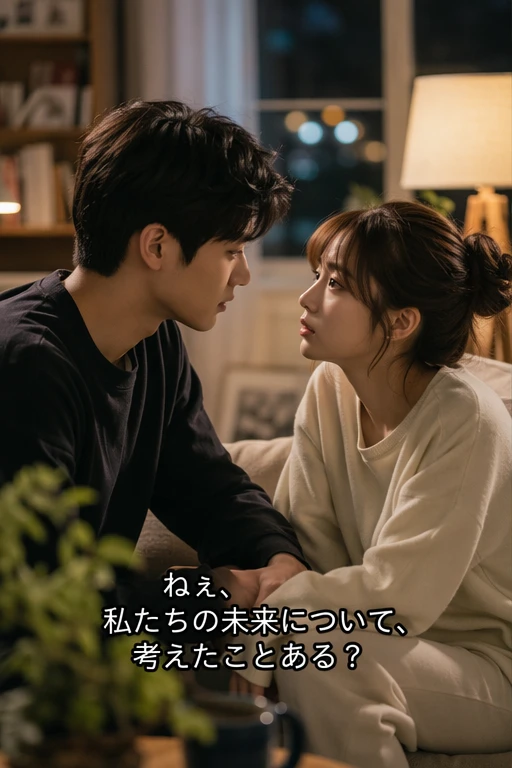
AntesVideo with hardcoded subtitles before AI removal - UnmarkAI
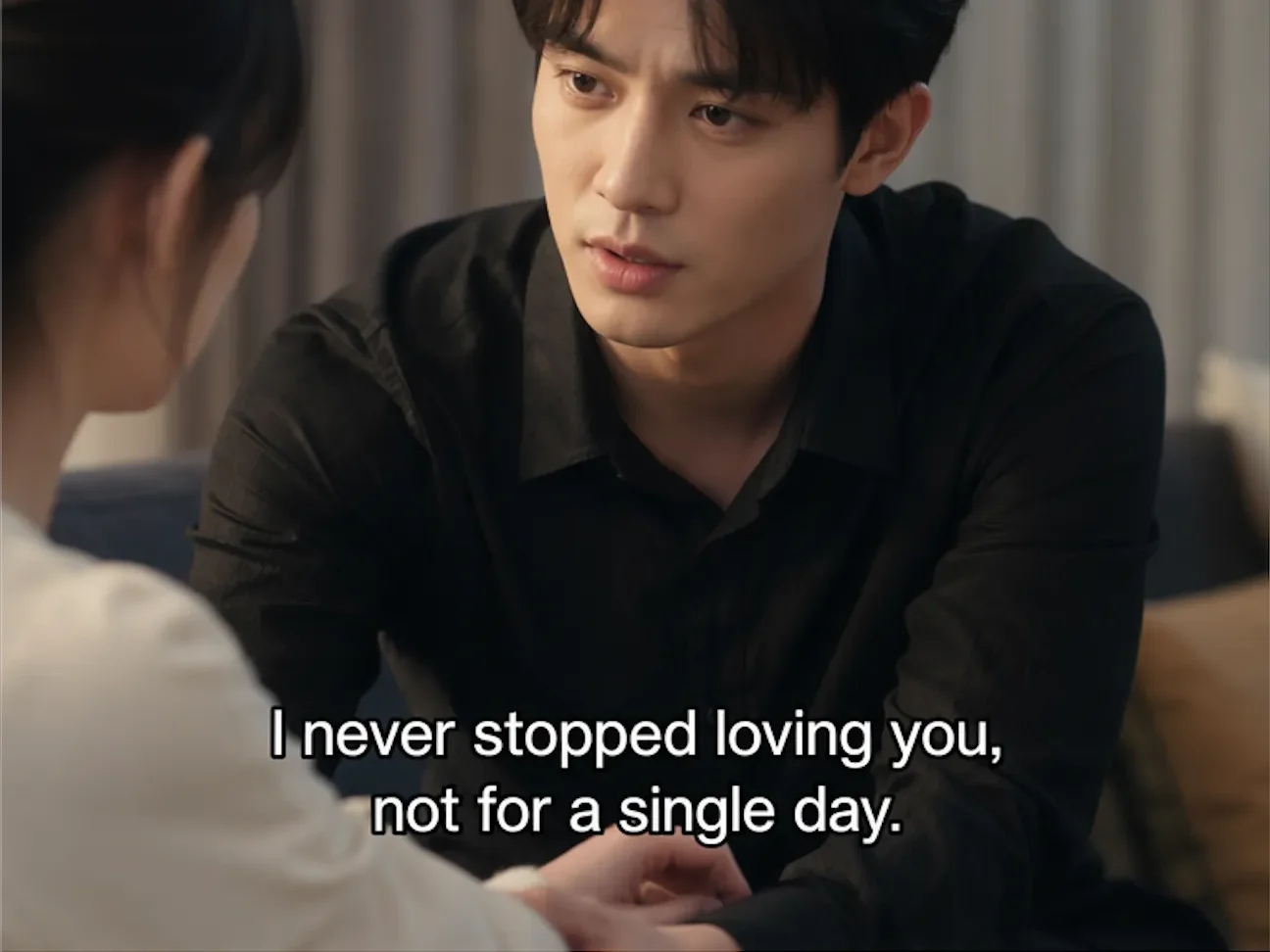
DespuésVideo after AI subtitle removal, clean background restored - UnmarkAI

Limpia marcas de agua, texto, subtítulos o logos con IA, manteniendo el encuadre y la calidad del video siempre que sea posible.

UnmarkAI ayuda a creadores, marcas y equipos a limpiar videos propios, licenciados o autorizados desde el navegador.

Herramienta online para limpiar videos con IA

La IA suele verse más natural que recortar o desenfocar cuando trabajas con logos móviles, subtítulos, fechas o texto incrustado.

  • Soft subtitles (SRT/VTT/ASS): separate text track, can be toggled off in the player, no removal needed — just disable the track.
  • Hardcoded/burned-in subtitles: text is fused into the video frames at the pixel level, visible in every frame regardless of player settings.
  • AI-generated embedded text: tools like Seedance 2.0, Kling, and Happy Horse render text directly into the output — functionally identical to hardcoded subtitles.
  • How to tell the difference: turn off all subtitle tracks in your player. If the text is still visible on screen, it is hardcoded and requires AI inpainting to remove.

Cómo limpiar una marca de agua de un video online

Sube un video que puedas editar, marca la zona a limpiar, revisa la vista previa y descarga el resultado.

01

Cómo limpiar una marca de agua de un video online

Sube un video que puedas editar, marca la zona a limpiar, revisa la vista previa y descarga el resultado.

02

Select the subtitle region

Draw a box around the area where subtitles appear. The AI identifies text boundaries within that region and maps the subtitle area across every frame in the clip.

03

AI removes and restores

AI inpainting erases the subtitle text and reconstructs the original background behind it. Preview the result side-by-side, then download the clean export.

Hardcoded subtitle removal results

See how AI inpainting removes burned-in subtitles without cropping the frame or leaving blur artifacts. The original background is reconstructed pixel by pixel.

  • Background restoredAI reconstructs the scene behind the subtitle text, filling in the area with matching detail.
  • No crop or quality lossThe full video frame stays intact at original resolution — nothing is cut away.
  • Works on any subtitle styleHandles white text, colored captions, outlined fonts, and multi-line overlays.
  • Frame-by-frame precisionEvery frame is processed individually so moving backgrounds and scene transitions stay clean.
AntesBurned-in subtitle removal - before
DespuésBurned-in subtitle removal - after
¿Quieres un video más limpio?Con IA, sin desenfoque y sin perder calidad.
Empezar gratis
AntesAuthorized subtitle removal - before
DespuésAuthorized subtitle removal - after
¿Quieres un video más limpio?Con IA, sin desenfoque y sin perder calidad.
Empezar gratis

When removing subtitles is perfectly legal

Subtitle removal is legitimate when you own the content, have licensing rights, or need to fix AI-generated output. It is not intended for stripping subtitles from copyrighted material you do not have rights to.

  • Your own contentVideos you created yourself, where you control all editing and distribution rights.
  • Translation and localizationRemoving original-language subtitles to replace them with target-language versions for authorized distribution.
  • AI-generated video fixesCleaning garbled or corrupted text rendered by AI video generators like Seedance, Kling, or Happy Horse.
  • Educational and research useRemoving subtitles for academic analysis, accessibility research, or archival purposes with proper authorization.

Compatible con formatos y dispositivos comunes

Funciona en móvil y escritorio con formatos como MP4, MOV y WebM directamente desde el navegador.

  • Video formats: MP4, MOV, AVI, MKV, WebM — all common container types supported.
  • Hardcoded subtitles in English, Chinese, Arabic, Spanish, and all major languages.
  • Garbled or corrupted text from AI video generators (Seedance, Kling, Happy Horse) can be erased the same way.
  • Resolution limits: best results under 4K. Higher resolutions require more processing time.

Pensado para reutilizar contenido propio

Prepara clips propios, anuncios, tutoriales o material autorizado para publicarlos en distintos canales.

  • Short drama translation: Chinese short dramas with burned-in subtitles → AI erases the original text → clean video → add target-language subtitles (English, Spanish, Arabic). Batch-process entire series efficiently.
  • AI video subtitle repair: Seedance 2.0, Kling, Happy Horse, and similar tools sometimes produce garbled, misaligned, or corrupted text overlays. AI inpainting cleans the damaged area so you can re-add correct subtitles.
  • Multi-platform content reuse: Remove region-specific subtitles to create a clean master, then add localized subtitles for TikTok, Instagram Reels, YouTube Shorts, or ad campaigns.
  • Training and educational content: Update outdated subtitle content in corporate training videos, online courses, or instructional media without re-recording.

Trabaja solo con contenido autorizado

Usa UnmarkAI con videos propios, licenciados o con permiso explícito. No elimines atribuciones de contenido de terceros.

  • Videos you created yourself — you hold all editing and distribution rights.
  • Licensed or authorized content — where the license permits derivative edits and subtitle changes.
  • AI-generated content you prompted — fixing garbled output from your own AI video generations.
  • Educational, research, or archival purposes — with proper attribution and authorization. Never use this to redistribute copyrighted content without permission.

Por qué la limpieza con IA se ve más natural

La IA reconstruye las zonas cubiertas usando el contexto del video y evita los recortes o manchas visibles.

  • AI inpainting: removes subtitle text and reconstructs the original background with matching detail and texture.
  • Cropping: sacrifices the bottom portion of the frame, cutting off lower-body composition, on-screen text, or visual elements.
  • Blurring: leaves a visible smudge or mosaic where the subtitle was — immediately noticeable and unprofessional.
  • Batch processing: queue multiple videos at once for subtitle removal — no manual frame-by-frame editing required.
Confianza

Creado para limpiar videos con autorización

UnmarkAI está pensado para creadores y equipos que trabajan con contenido propio, licenciado o con permiso para editar.

Flujo atento a derechosVista previa antes de descargarProcesamiento seguroPolítica de uso clara

Preguntas frecuentes

Respuestas prácticas para limpiar videos con seguridad y buena calidad.

¿Para qué tipo de videos sirve?

Sirve para videos propios o autorizados, como clips sociales, material de marca, tutoriales y archivos internos.

Can I remove subtitles without cropping the video?

Yes. UnmarkAI uses AI inpainting to erase subtitle text and reconstruct the background behind it. The full video frame stays intact at original resolution — no cropping needed.

Does it work on burned-in (hardcoded) subtitles?

Yes. Hardcoded subtitles are rendered directly into the video pixels. AI inpainting detects the text, removes it frame by frame, and fills in the area with matching background detail.

What is the difference between hardcoded and soft subtitles?

Soft subtitles (SRT, VTT, ASS) are a separate text track that can be toggled on or off in your media player — no removal needed. Hardcoded (burned-in) subtitles are rendered into the video pixels and cannot be turned off; they require AI inpainting to erase.

¿Listo para limpiar tus videos?

Reduce distracciones y prepara clips más profesionales para publicar o entregar.

Empezar gratis ahora

Recibe 10 créditos al registrarte · Sin tarjeta de crédito