
什么是视频硬字幕去除?
视频硬字幕去除是指擦除已经烧录进画面像素里的字幕文字,并用 AI 重建字幕背后的背景。它不同于关闭 SRT、VTT 或 ASS 软字幕轨道,适合你拥有、已授权或明确允许编辑的视频。
拖拽文件到这里,或点击浏览
MP4、MOV、AVI、MKV、WebM · 最大 2GB
查看前后对比 →
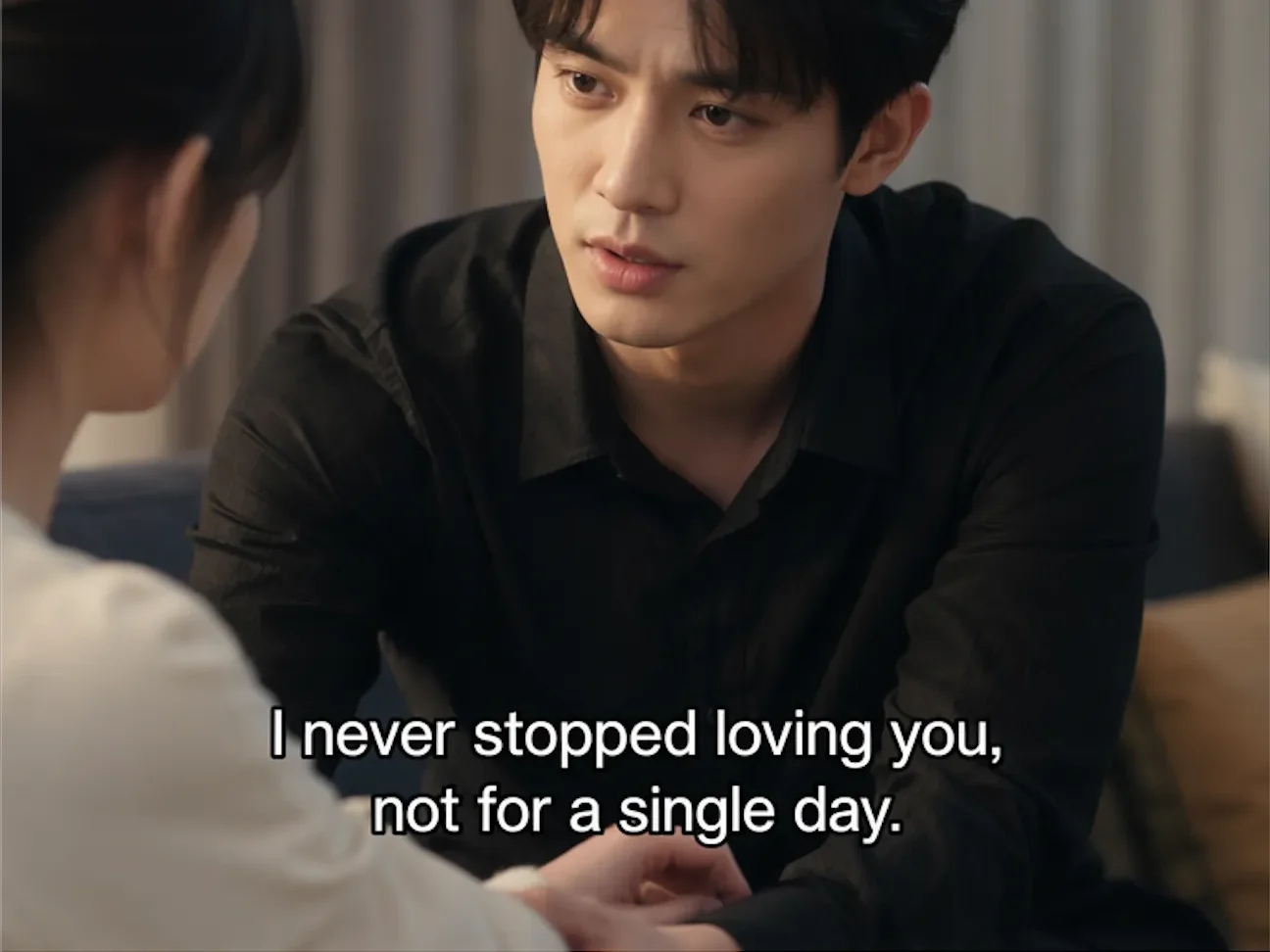

去除你拥有或已获授权视频里的硬字幕、内嵌字幕和烧录字幕。AI 会逐帧识别字幕区域,擦除文字并重建原始背景,不裁剪、不模糊,尽量保留高清画质。
UnmarkAI 使用 AI 修复清理已经烧录进画面像素的字幕。和可关闭的 SRT/VTT 软字幕不同,硬字幕不能在播放器里隐藏,需要擦除字幕文字并补全背后画面。
视频硬字幕去除是指擦除已经烧录进画面像素里的字幕文字,并用 AI 重建字幕背后的背景。它不同于关闭 SRT、VTT 或 ASS 软字幕轨道,适合你拥有、已授权或明确允许编辑的视频。
可以。对于自有或授权的翻译、本地化和短剧处理流程,AI 可以清理原语言硬字幕区域并补全背景,然后再添加中文、英文、西语、阿语等目标语言字幕,同时保留完整画幅。
软字幕是独立字幕轨道,可以在播放器里关闭;硬字幕、烧录字幕和内嵌字幕已经变成视频像素,无论播放器设置如何都会显示。只有硬字幕才需要 AI 去字幕和背景修复。
这类字幕是独立轨道,通常只需在播放器或剪辑软件里禁用,不需要 AI 擦除。
文字成为每一帧画面的一部分,必须擦除字幕区域并重建背景。
Seedance、Kling、Happy Horse 等生成的错字或乱码可按硬字幕处理。
如果隐藏所有字幕轨道后文字还在画面上,就需要 AI 修复。
此流程用于已经烧录进画面像素的字幕。如果文件使用独立 SRT、VTT 或 ASS 轨道,请直接关闭或删除轨道,无需 AI 修复。
上传含有硬字幕、内嵌字幕或烧录字幕的 MP4、MOV、AVI、MKV、WebM。建议使用你有权编辑的高清源文件,避免二次压缩。
在底部字幕条或 caption 出现的位置画一个紧凑选区。AI 会在该范围内识别文字边界,并把字幕区域映射到每一帧。
AI 逐帧擦除字幕文字,重建背后的纹理、颜色和运动细节。对比预览后下载无字幕版本。
通过视频去字幕 API 批量处理自有或已授权的视频。可导入公开 HTTPS 视频地址或上传本地文件,选择全画面或指定区域去字幕,并通过轮询或签名 Webhook 获取结果。
查看视频去字幕 API上传本地视频,或异步导入可直接下载的 HTTPS 地址。
根据字幕位置选择 all_area 或 sel_area,并附带幂等键。
轮询任务资源,或在后端接收签名 Webhook 事件。
任务完成后,从临时签名地址下载处理结果。
查看 AI 如何去除烧录字幕,同时保留完整画面。无需裁剪或打码,字幕背后的背景会按帧修复。
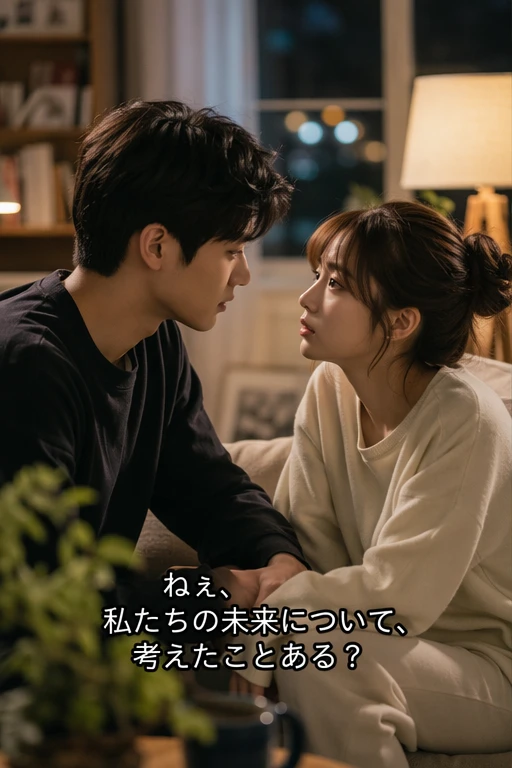



去字幕适合自有内容、本地化翻译、AI 视频修复和获得授权的交付素材,不应用于未经许可的版权内容。
支持 MP4、MOV、AVI、MKV、WebM 等常见视频格式,可处理中文、英文、日文、西语、阿语等多语言字幕,以及白字、彩色字、描边字、多行 caption 和半透明字幕。
覆盖短剧、课程、广告、社媒视频和 AI 生成视频常见格式。
多语言硬字幕都可以框选清理,再添加新的目标语言字幕。
AI 会针对字幕实际像素和边缘进行清理,不限单一字体样式。
高清源文件能提供更多背景细节,通常比低清二压素材更自然。
中国大陆、香港、台湾和新加坡团队常用它清理自有短剧、课程录屏、品牌素材和 AI 生成视频里的旧字幕,再重新添加目标语言字幕,用于抖音、小红书、B站、视频号、Reels 或 YouTube Shorts。
先去除原语言硬字幕,再添加目标语言字幕,适合多集授权内容本地化。
擦除 Seedance、Kling、Happy Horse 等视频里的乱码、错位或损坏文字。
为抖音、小红书、B站、视频号、Reels、Shorts 制作干净母版。
替换旧字幕或课程说明文字,不必重新录制整段视频。
请只去除你自己创作、购买授权、团队拥有、客户批准或内容方明确允许编辑的视频字幕。不要用来移除未授权影视、课程或第三方内容的字幕并重新分发。
适用于原创短片、课程、广告、讲解和团队自有内容。
素材许可或客户确认应允许字幕替换、翻译和最终导出。
内部资产可以按团队授权流程清理旧字幕并重新发布。
不要移除未授权影视、课程或第三方内容字幕并重新分发。
裁剪会切掉底部画面,模糊会留下明显色块。AI 修复会删除字幕像素,并根据周围颜色、纹理和运动补全背景,让画面更像从未带过字幕。
擦除字幕像素后,根据周围颜色、纹理和运动补全画面。
不必裁掉人物、产品、UI 或其他下方视觉信息。
比打码、马赛克或模糊遮盖更适合正式发布。
多集短剧、课程或广告素材可以按相似字幕位置连续处理。
UnmarkAI 面向创作者和团队,用于处理自己拥有、已授权或有权编辑的内容。产品文案、条款和上传流程都会强调这一边界。
帮助你清理自己拥有、已授权或明确有权编辑的视频。
导出干净视频前,可以逐帧检查 AI 修复效果。
文件会被安全处理以提供服务。有关保留期限和服务商处理的详情,请查看隐私政策。
明确禁止未经授权移除第三方内容的署名或必要标记。
关于安全、高质量视频清理流程的实用解答。
可以。如果 caption 已经烧录进视频像素,可框选字幕区域并由 AI 擦除文字、重建背景。如果是独立 SRT、VTT 或 ASS 轨道,直接关闭或删除轨道即可。
可以。AI 会擦除字幕文字并补全背后画面,尽量保留原画幅和清晰度。
软字幕是独立轨道,可以在播放器关闭;硬字幕已经烧录进视频像素,无法关闭,需要 AI 修复去除。
可以,前提是你拥有或获得授权。先去除原语言硬字幕,再添加目标语言字幕,适合多集短剧本地化。
可以。Seedance、Kling、Happy Horse 等工具生成的错字、乱码或错位文字可以作为硬字幕区域清理。
工具会尽量保留原分辨率。字幕区域会由 AI 重建,源文件越清晰、选区越准确,结果越自然。
让视频少一点干扰,更适合发布、交付和复用。
注册获得 10 个积分 · 无需付费