Translate video to English

Translate Any Video to English with AI

Turn Spanish, Chinese, Japanese, Hindi, Arabic, and other source videos into clear English versions. Clean burned-in source captions, translate the script, add English subtitles or dubbing, and review the final timing before export.

Upload a video to translate into English

Drop an authorized source video and continue with English preselected.

MP4, MOV, or WebM

English (US) is preselected in the workbench

🎬English translation preview
πŸ‡ΊπŸ‡ΈEnglish
English AI video translation demo
One English workflow for global video teams
Creators
Tutorials
Interviews
Product demos
Courses
Short-form video
Direct answer

How do I translate a video to English?

Upload a video you own or are authorized to localize, let the workflow detect its spoken language, then generate an English transcript, subtitles, and optional voiceover. Review names, timing, and pronunciation before exporting the English version.

Audio + captions

Can AI translate both video audio and subtitles?

Yes. Choose English subtitles, English dubbing, or both. The workflow can preserve background audio, assign voices to speakers, and keep translated captions aligned with the English narration.

Clean source

What if the video already has burned-in subtitles?

Remove source-language captions from the pixels first so old text does not sit underneath the English subtitles. This creates one clean master for dubbing, re-captioning, and future localization.

Spanish to English example

Replace source-language captions with a clean English delivery

A good English version changes more than words. It clears conflicting source text, preserves meaning and speaker tone, and gives the final subtitles enough room to stay readable.

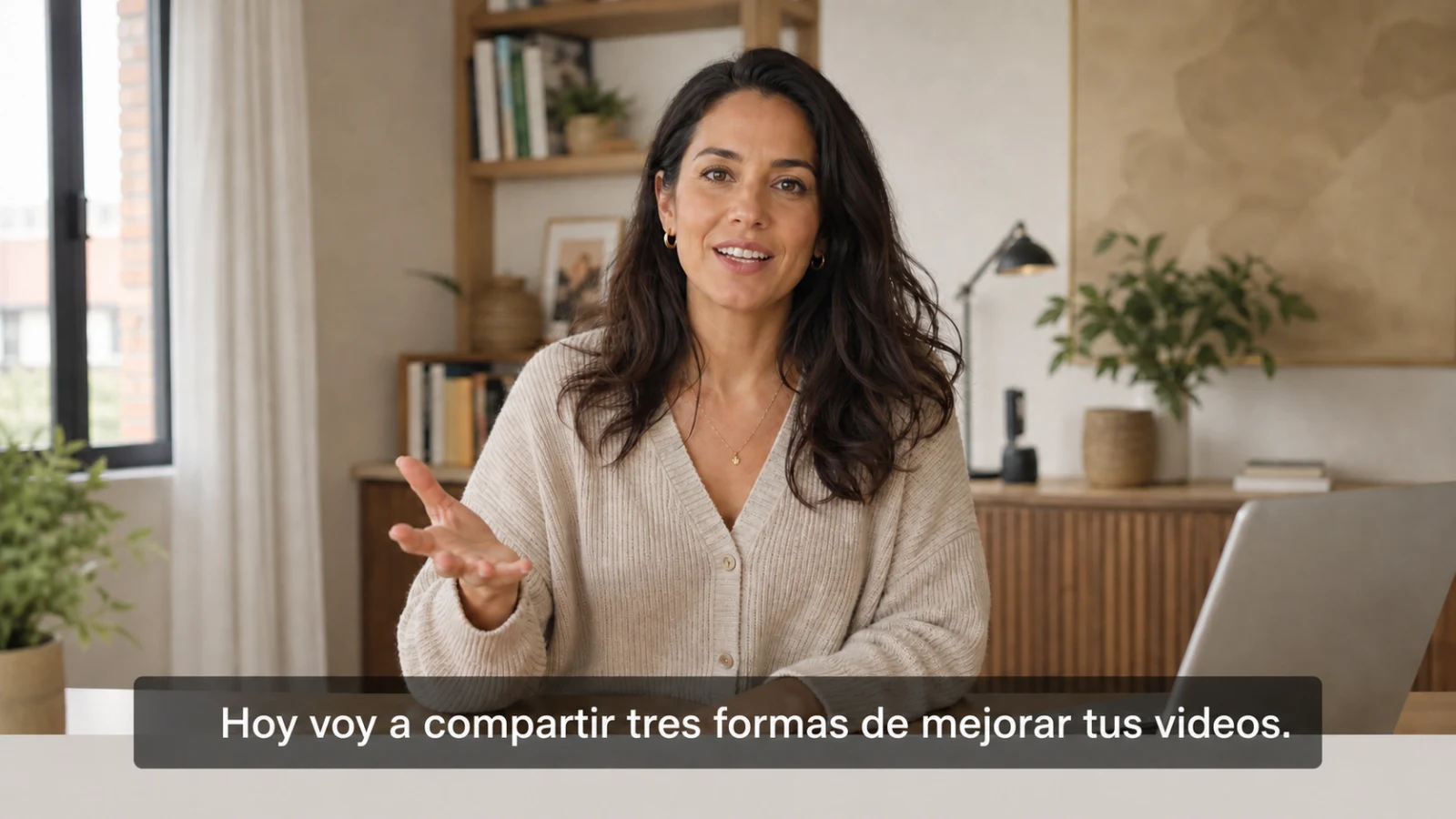
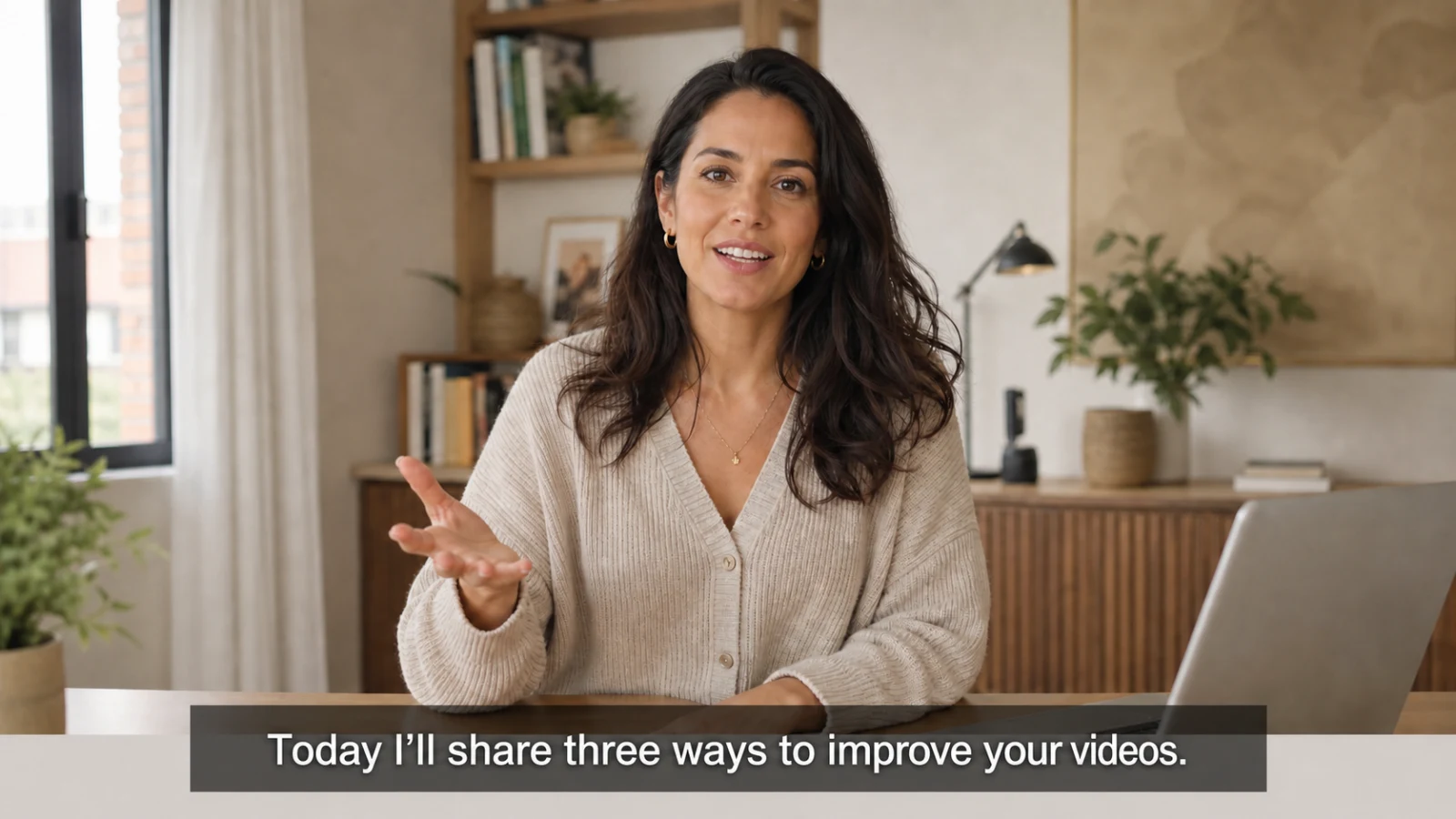
Video-to-English comparisonSame creator Β· English target
Talking-head creator video with Spanish source subtitles before English translation
SourceSpanish captions remain in the frame

Hoy voy a compartir tres formas de mejorar tus videos.

Matching talking-head creator video with English subtitles after AI translation
EnglishEnglish subtitles and voice are ready

Today I’ll share three ways to improve your videos.
Choose the English output

English subtitles, dubbing, transcript, or all three

Match the output to how viewers will watch and how your team plans to publish.

01 Β· Subtitles

English subtitles only

Keep the original voice and add timed English captions for accessibility, silent autoplay, or a faster localization pass.

02 Β· Dubbing

Natural English voiceover

Replace spoken audio with an English voice while preserving pacing, speaker roles, and the energy of the original delivery.

03 Β· Both

English dubbing plus subtitles

Pair English audio with readable captions for maximum comprehension across feeds, courses, presentations, and embedded players.

04 Β· Transcript

Editable English transcript

Review names and terminology, then reuse the approved English transcript for captions, articles, notes, or translation QA.

How it works

From a foreign-language source to an English-ready export

The workflow keeps visual cleanup, translation, voice, captions, and delivery review in one path.

AI workflow showing a talking-head source video moving through transcript, English translation, voiceover, subtitle timing, and export review
English localizationFrom a foreign-language source to an English-ready export

The workflow keeps visual cleanup, translation, voice, captions, and delivery review in one path.

How it works

From a foreign-language source to an English-ready export

The workflow keeps visual cleanup, translation, voice, captions, and delivery review in one path.

Translate to English
01Source detected

Upload and detect the source language

Add an authorized video and let the workbench identify the spoken language, speakers, and available source captions.

02Clean master ready

Clean burned-in source text

Remove old captions or select the affected region before adding English subtitles to the frame.

03English approved

Translate and review the English script

Check names, terminology, tone, and meaning before generating final subtitles or speech.

04Export ready

Dub, subtitle, and export

Generate English audio, align timing, review the output, and export the finished localized video.

Source languages

Translate videos from major languages into English

Auto-detect the source or choose it manually, then keep English as the target language.

SpanishSpain Β· Mexico Β· LATAM
ChineseSimplified Β· Traditional
JapaneseJapan
KoreanSouth Korea
HindiIndia
ArabicMiddle East Β· GCC
PortugueseBrazil Β· Portugal
FrenchFrance Β· Canada
GermanGermany Β· Austria
VietnameseVietnam
Popular workflows

Built for the videos people need to understand in English

Use one reviewed English version for publishing, training, sales, research, or global distribution.

Creators

YouTube and social videos

Translate authorized creator videos into English for international channels, clips, and platform-ready re-exports.

Education

Courses and tutorials

Create clear English narration and captions while keeping technical terms consistent across lessons.

Business

Product demos and webinars

Localize product claims, walkthroughs, presentations, and customer stories for English-speaking markets.

Interviews

Talking-head and multi-speaker video

Keep each speaker distinct and review pacing before the English dub is rendered.

English QA

Review meaning, timing, and delivery before publishing

English localization needs more than automatic word replacement. Check the full video so the translated result reads and sounds intentional.

01

Lock names and terminology

Use a glossary for people, products, places, and repeated phrases.

02

Check speaker and voice assignments

Keep interviews and conversations clear when more than one person speaks.

03

Review subtitle safe zones

Keep English captions away from platform controls and important visual content.

04

Confirm timing and pronunciation

Check scene cuts, speech rhythm, emphasis, and final audio balance.

Workflow comparison

Where UnmarkAI fits in video-to-English localization

Workflow needSubtitle-only toolDubbing-only toolUnmarkAI
Remove burned-in source captionsβœ— Noβœ— Noβœ“ Clean master first
Generate English subtitlesβœ“ Yes~ Sometimesβœ“ Included
Generate English voiceoverβœ— Noβœ“ Yesβœ“ Speaker-aware options
Review visual cleanup, text, and voice togetherβœ— Separate tools~ Audio focusedβœ“ Unified QA path
Related translation workflows

Continue through the video translation cluster

Use the English page for a fixed target language, or open a content-specific workflow when the source is a product demo or short drama.

Parent hub

AI video translation

Choose any supported target language and review the complete clean-master translation workflow.

Open translation hub
E-commerce

Product video translation

Localize product demos with consistent SKUs, claims, subtitles, and market-ready voiceover.

Open product workflow
Entertainment

Short drama translation

Prepare vertical episodes with character-aware dubbing, subtitle timing, and batch QA.

Open drama workflow
FAQ

Translate video to English questions

How can I translate a video to English online?

Upload an MP4, MOV, or WebM video you own or are authorized to localize. English is preselected as the target. Review the detected source language, choose subtitles, dubbing, or both, and export the approved English version.

Can I translate video audio to English instead of only adding subtitles?

Yes. Generate an English voiceover and keep the original background audio when your plan supports it. You can also add English subtitles to the dubbed export.

Can I translate a Spanish, Chinese, or Japanese video to English?

Yes. UnmarkAI supports major source languages including Spanish, Chinese, Japanese, Korean, Hindi, Arabic, Portuguese, French, German, Vietnamese, and more.

Can AI keep multiple speakers separate in English?

The workflow can detect and review speaker roles, then assign distinct English voices so interviews, podcasts, and conversations remain understandable.

What happens to subtitles already burned into the source video?

Burned-in subtitles are part of the pixels. For authorized content, remove them before translation so they do not overlap with the new English subtitles.

Can I choose US or UK English?

The landing page opens with English (US) selected. In the workbench you can switch the English locale and available voice options before creating the task.

Is the English translation ready to publish automatically?

AI speeds up transcription, translation, and voice generation, but important videos should still be reviewed for terminology, pronunciation, timing, speaker assignment, and visual quality before publication.

Start in the workbench

Translate your video into English

Upload an authorized source video, keep English selected, and create a reviewed version with subtitles, dubbing, or both.

Last updated: July 2026 Β· Reviewed by the UnmarkAI localization team

Translate video to English