
How to Change an Expired Offer in a Finished Video
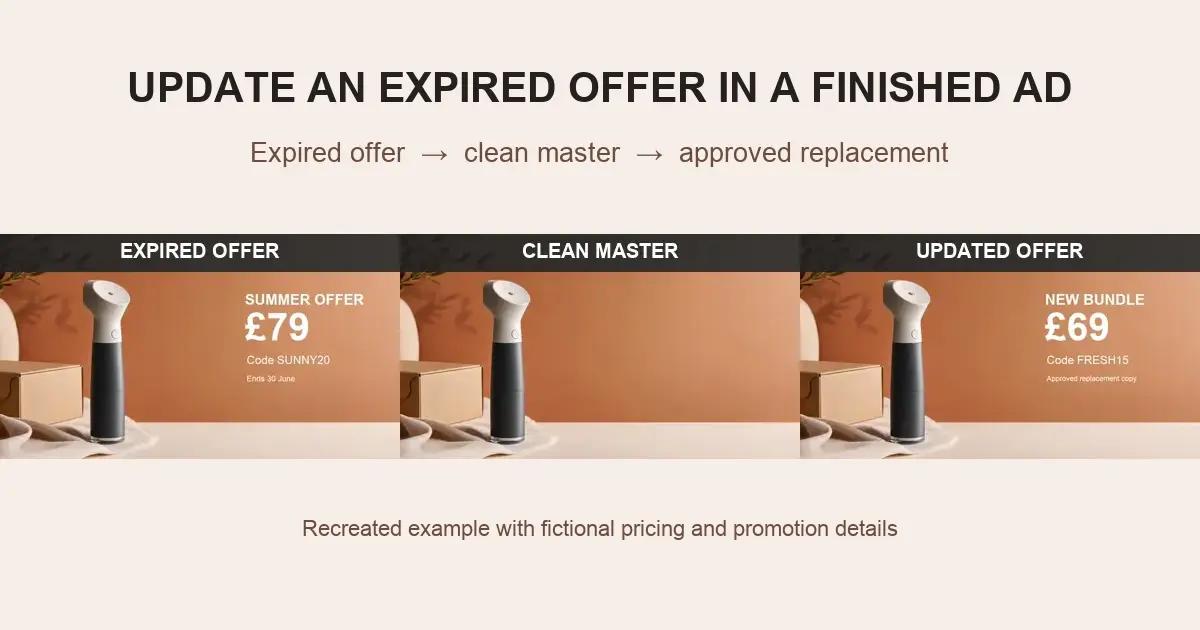
A strong video advertisement can become unusable because of one expired detail: an old price, ended promotion, invalid coupon code, campaign date, or market-specific call to action. If that wording is burned into the final MP4, changing it is no longer a simple text edit.
The safest reusable workflow is to confirm that the offer is part of the picture, remove the obsolete graphic, inspect a clean version, and then add approved replacement copy as a new editable layer.
Why Can’t You Simply Edit the Old Price or Promo Code?
If the offer was created inside the original editing project, its numbers and letters can be changed there. If it is supplied by the advertising platform as a separate asset, update or disable it in the platform instead.
But when the offer is visible inside every exported frame, the MP4 contains no editable price field. The old text must be visually removed before a replacement can occupy the same space.
Which Finished-Ad Elements Commonly Become Outdated?
Prices and discount percentages
Regional pricing, sale amounts, bundles, and introductory offers can change while the underlying footage and product demonstration remain useful.
Promo codes and campaign dates
Short-lived codes and end dates make otherwise evergreen footage time-sensitive. Reusing the ad without changing them can confuse customers.
Calls to action and destination wording
A campaign may move from “Shop the launch” to “Explore the collection,” or from one marketplace to another, while keeping the same visual creative.



What Should You Confirm Before Changing the Ad?
Confirm ownership or editing permission, identify the approved replacement offer, and check whether any adjacent fine print must change with it. Determine whether the visible element is a removable marketing overlay, a platform asset, a real product label, or a required disclosure.
Do not remove a disclosure simply because it makes the layout difficult. Route regulated, contractual, or required wording to the appropriate legal, marketplace, and campaign reviewers.
Step-by-Step: Update Promo Text in a Finished Video Ad
Step 1: Freeze the obsolete version
Save the original file and record where it has been published. Give the replacement project a new version number instead of overwriting the only available copy.
Step 2: Inventory every dependent line
A price may be linked to a discount percentage, promo code, date, shipping condition, or footnote. List the complete offer block so the new version does not combine incompatible old and new details.
Step 3: Select only the embedded promotional graphic
Use a tight cleanup region. Avoid masking the product, real package print, or other permanent brand elements unless they are separately authorized for revision.
Step 4: Restore the underlying frame
AI inpainting can reconstruct the background using nearby texture and information across frames. Process scene changes separately and preserve the highest-quality source export.
Step 5: Review motion and compression artifacts
Watch the entire cleaned region at normal speed. Check gradients, shadows, product edges, hands, and camera movement for flicker or letter-shaped residue.
Step 6: Add approved replacement copy
Create a new editable graphic with the correct price, currency, code, date, CTA, and qualification. Verify it against the campaign brief before exporting the replacement ad.
Use UnmarkAI to Prepare the Clean Version
Use UnmarkAI to clean the obsolete embedded text from an authorized video before rebuilding the offer. For ads that will also be translated or adapted across marketplaces, continue with product-video translation or review the available video cleanup workflows.
Which Update Method Should You Choose?
Update the advertising-platform asset
Choose this first when the price or promotion is separate from the uploaded video. It avoids editing the media file at all.
Cover the old offer with a designed panel
This can work when the panel is an intentional part of the visual system and fully contains the old text. It looks poor when placed over a moving or textured background.
Return to the source project or reshoot
Best when the product, packaging, demonstration, or required disclosure has materially changed. The higher production cost may be justified by the risk of an inaccurate ad.
Restore a clean master and add a new offer
Best when the footage is still approved and only a burned-in marketing graphic is obsolete. The clean version can support later campaigns without repeated restoration.
When Is Manual Finishing More Likely?
Manual work is more likely when the offer crosses hands, reflective product edges, detailed packaging, fast camera moves, particles, or motion blur. A large opaque banner over a simple studio background is usually easier than thin letters moving across a complex demonstration.
Compliance Note
Only update ads that you own, license, or have permission to modify. Replacement prices, claims, dates, promo conditions, and disclosures must be accurate and approved for the intended placement and market. Do not remove attribution or mandatory information from third-party content.
FAQ
Can I change a promo code in a finished MP4?
Yes, when you are authorized to edit the ad. Remove the old embedded code, review the restored background, and add the approved new code as an editable layer.
Should I blur the old price and place the new one on top?
A blur often leaves a visible patch and reduces trust in a commercial. A clean-master approach is usually better for publication-quality footage.
What if the price is part of a platform overlay?
Update the price or promotion in the advertising platform, catalog, or merchant system rather than editing the video. Confirm the actual source before starting visual cleanup.
Can the footnote be changed separately?
It can be, but review it together with the headline, price, date, and conditions. Small qualification text often depends on the main offer.
Can I update several versions from one clean master?
Yes. Keep the clean master free of temporary offers, then build individual market, channel, and campaign versions with editable graphics.
When should the original advertisement be retired?
Retire or replace it when its offer is no longer accurate or approved. Maintain an archive for production records, but do not continue distributing obsolete customer-facing information.
Create a Clean Version Before Adding the New Offer
Remove the expired graphic from your authorized video with the embedded-text cleanup workflow, inspect the result, and add the approved replacement as a new editable layer.