
How to Remove Text from Video with an MCP Server
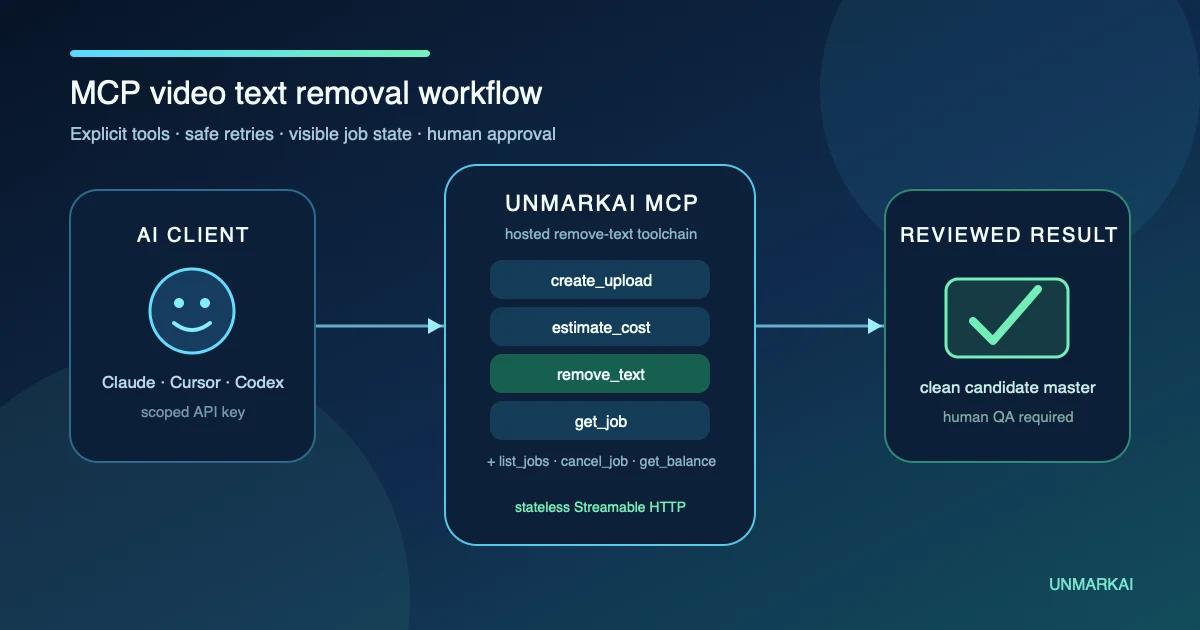
To remove text from video with MCP, connect an MCP-capable AI client to a trusted server that exposes video cleanup tools. The agent registers the file, transfers it through a signed upload URL, starts an asynchronous remove-text job, checks status, and downloads the result for human review. You still control credentials, permissions, cost, the selected region, and final approval.
MCP does not make the video model itself. It gives an AI agent a structured, discoverable way to call the service that performs the cleanup. That distinction matters when you evaluate security, capabilities, and output quality.
Why Use MCP for Video Text Removal?
A browser editor works well for a person handling one clip. A REST API works well when a developer is building a stable application or production pipeline. MCP is useful when an AI agent should coordinate a known tool sequence inside the environment where a technical operator already works.
The Model Context Protocol specification defines tools as model-controlled capabilities that a server exposes with names, descriptions, and input schemas. The model can discover those tools and call them in context, while the server remains responsible for the actual operation and its authorization rules.
Video work is a multi-step job, not one magic call
A remote cleanup service cannot safely assume that a local path on your laptop exists on its server. The file must be registered and uploaded, a job must be created, progress must be checked, and the result must be retrieved.
An MCP server can express those stages as separate tools. This gives the agent enough structure to recover from a failed upload, reuse an idempotency key, wait for processing, or report insufficient balance instead of hiding the workflow behind one opaque prompt.
Remote MCP reduces setup but does not remove trust decisions
The official MCP documentation recommends Streamable HTTP for remote servers. A hosted endpoint means the client does not have to install and run a local server package, but the operator still needs to trust the service, understand which tools it exposes, and protect the credential sent to it.
Anthropic's Claude Code documentation explicitly advises users to verify that they trust an MCP server and notes that remote HTTP is the recommended option for cloud-based services. Apply the same care in any client: review the URL, scopes, tool list, and what data will leave the machine.
Agents coordinate; people approve
An agent can inspect file properties, request an estimate, start a job, and organize the returned artifacts. It cannot decide whether you own the video, whether a watermark or attribution mark may be removed, or whether a reconstructed face, product, document, or safety label is acceptable.
Human review remains a required production gate.
What Is an MCP Video Text-Removal Workflow?
An MCP video text-removal workflow lets an AI agent coordinate a remote cleanup service through named, schema-defined tools. The operator connects a trusted MCP-capable client, supplies a scoped API key, and identifies an authorized local video. The agent requests a one-time upload ticket, then uses the signed URL and required headers to transfer the actual file bytes; the remote MCP server cannot read a local path by itself. After upload, the agent can estimate cost, choose full-frame or selected-area cleanup, create an idempotent asynchronous job, and wait for a terminal status without rapidly polling. A successful job returns a temporary signed result URL, which the agent downloads promptly. The operator then compares the output with the source during motion, checks the repaired area, subjects, audio, duration, and technical properties, and approves or rejects the result. MCP standardizes how the agent invokes tools; it does not replace permission checks, secret management, quality assurance, or accessible final captions.
This model is most valuable when the workflow has repeatable stages but still benefits from operator judgment. It turns natural-language intent into explicit tool calls without turning every decision into an invisible automation.
How Do You Remove Text from Video with MCP Step by Step?
- Confirm rights and define the allowed edit. Identify who owns the footage, what the license permits, and exactly which captions, timestamps, labels, or owned overlays may be removed. Protect attribution, provenance, watermarks that identify ownership, safety information, evidence, and legally required text.
- Choose a trusted MCP client and server. Use Claude Code, Cursor, Codex, or another client that supports remote MCP. Verify the endpoint from an official product page or repository. Read the tool list and data flow before sending a source file. Do not connect a look-alike domain or an unreviewed server configuration.
- Create a scoped credential. In the UnmarkAI API Console, create an `uma_live_*` key with only the scopes the workflow needs: job write access for uploads and cleanup, job read access for status and results, and balance read access if the agent should estimate cost. Store it in a secret manager or environment variable, not in a public repository, browser bundle, screenshot, chat transcript, or shared URL.
- Connect the remote HTTP endpoint. Point the client at `https://api.unmarkai.net/mcp` and send the API key in the Authorization bearer header. Claude Code supports an authenticated remote server through its `claude mcp add --transport http` command. Cursor and other clients use their documented MCP configuration. OpenAI's Codex MCP documentation covers adding and managing MCP servers for Codex surfaces.
- Inspect the video locally. Confirm the bare filename, content type, exact byte size, duration, width, height, and frame rate. If using selected-area cleanup, identify rectangle coordinates on the original frame and add a small margin around the unwanted text. Review several frames because a caption may move or expand.
- Request and use a signed upload ticket. Call `create_upload` with the filename, supported video content type, and exact byte size. The tool returns an upload ID plus a one-time signed PUT URL and required headers. Transfer the bytes with every supplied header unchanged. If the ticket has already been used or expires, request a fresh one instead of improvising the upload request.
- Check balance and estimate the job. Call `get_balance` for the authoritative wallet, rates, tier, and concurrency information, then call `estimate_cost` with the video duration and cleanup mode. Treat the response as a preflight estimate. The job record remains authoritative for the final charge.
- Create an idempotent cleanup job. Call `remove_text` only after the upload completes. Use `all_area` when unwanted text can appear throughout the frame or `sel_area` with original-pixel coordinates when it stays in a known region. Supply and retain one idempotency key so a network retry does not create a duplicate job during the supported window.
- Wait for a terminal status without aggressive polling. Call `get_job` with an optional wait of up to 60 seconds. The server can check internally and return early when the job succeeds, fails, or is canceled. If it is still validating, queued, or processing, call again later. Use `list_jobs` to reconcile recent work and `cancel_job` only while a job is still in a cancelable state.
- Download and review the result promptly. When the status is succeeded, download from the temporary signed URL and save it under a traceable name. Compare the video with the source at normal speed and around cuts, motion, occlusions, and text transitions. Check for remnants, blur, flicker, texture drift, changed subjects, audio sync, duration, resolution, and frame rate before approving it.


Which Seven Tools Does the UnmarkAI MCP Server Expose?
The hosted UnmarkAI Video Text Removal API and MCP page documents seven tools, all focused on the remove-text job lifecycle.
- `create_upload` registers a local video and returns a signed transfer ticket.
- `remove_text` creates a full-frame or selected-area asynchronous cleanup job.
- `get_job` returns progress, terminal status, errors, and a successful result URL.
- `list_jobs` pages through recent jobs and can filter by status.
- `cancel_job` stops a job that is still validating or queued.
- `get_balance` reports the API wallet, rates, and concurrency information.
- `estimate_cost` calculates a preflight estimate from duration and mode.
The server uses the same authentication, scopes, limits, job behavior, and billing contract as the REST API. That reduces the risk of MCP and REST becoming two different products with conflicting behavior.
The open-source UnmarkAI agent skills repository contains connection guidance and a fallback for environments that do not support MCP. Review the repository before installing or running any automation from it.
When Should You Use MCP, REST, or the Browser?
Browser, MCP, REST, and local automation compared
| Method | Best for | Setup | Main strength | Main responsibility |
|---|---|---|---|---|
| Browser editor | A person cleaning one or a few clips | Sign in and upload | Direct visual selection and preview | Manual operation and review |
| Hosted MCP server | An agent coordinating a technical workflow | Connect endpoint and scoped key | Discoverable tools in an existing AI client | Trust, secrets, approvals, and file transfer |
| REST API | A production application or backend pipeline | Build and maintain integration code | Stable programmatic control and webhooks | Engineering, retries, storage, and monitoring |
| Local scripts around REST | Repeatable operator jobs and prototypes | Shell or runtime environment | Transparent, versionable automation | Local dependencies and operational discipline |
MCP is not automatically better than REST. It is a different interface for agent-driven coordination. A production service with fixed inputs, high volume, and strict monitoring may still belong on the REST API. A person who needs to draw a cleanup box visually may prefer the browser.
How Can You Keep an Agent-Driven Cleanup Safe?
Limit the credential
Create a separate key for the agent workflow and grant only necessary scopes. Rotate or revoke it when exposure is suspected. Never put the full key in article copy, issue comments, recorded demos, or client-side JavaScript.
Make cost an explicit checkpoint
Ask the agent to check balance and estimate cost before calling the write tool. For a batch, start with one representative clip. Require confirmation before a large or unusual run, even if the MCP client can call tools automatically.
Preserve stable IDs
Keep the upload ID, job ID, idempotency key, source filename, source hash when available, and destination path together. These identifiers make retries and audits possible without relying on the agent's conversational memory.
Separate output from approval
A succeeded job means the service completed processing. It does not mean the result passed creative, legal, accessibility, or technical review. Record the reviewer and decision outside the job status.
Treat external content as untrusted
Video filenames, metadata, adjacent documents, and web pages can contain misleading instructions. Keep the requested edit narrowly defined and do not let unrelated content expand tool permissions or the removal target.
Where Does UnmarkAI Fit Beyond the MCP Call?
Use the MCP endpoint when an agent should coordinate the same asynchronous cleanup available through the public API. For hands-on selection, the remove-text-from-video workflow remains the clearer visual route. For burned-in subtitle-specific guidance, use the subtitle removal workflow.
After a cleaned result passes review, the video translation workflow can create language variants from the approved master. The AI video cleanup guide helps teams decide when text removal is the wrong tool because the actual problem is an ordinary object, a separate caption track, or image quality.
UnmarkAI helps produce candidate clean exports and localization-ready masters. The operator remains responsible for authorization, secret handling, scope, accessibility, output review, and publication.
Frequently Asked Questions
What does MCP mean in video editing?
MCP stands for Model Context Protocol. In a video workflow, an MCP server exposes structured tools that an AI client can discover and call. One server may edit timelines; another may search footage; UnmarkAI's hosted server currently focuses on the remove-text API job lifecycle.
Can the MCP server read a video directly from my laptop?
No. A remote server cannot access an arbitrary local path. The agent first requests a signed upload ticket, then transfers the file bytes to that URL with the required headers. Only after upload does it create the cleanup job.
Can Claude Code, Cursor, or Codex use the same endpoint?
Yes, when the client supports authenticated remote HTTP MCP. Configuration syntax differs by client, so follow its current official documentation. The UnmarkAI endpoint and scoped API key remain the same.
Does the MCP server remove all objects from video?
No. The current seven tools serve video text removal: hardcoded captions, timestamps, titles, labels, and similar visible text. Use an appropriate object-removal workflow when the target is not text.
What is the difference between `all_area` and `sel_area`?
`all_area` processes the full frame and suits text that can appear in different places. `sel_area` restricts cleanup to a rectangle defined in original-video pixel coordinates and suits a stable caption band or timestamp. Inspect the whole clip before assuming the region never moves.
How should an agent retry a failed request?
Reuse the same idempotency key when retrying the same job-creation request. Do not reuse an already consumed one-time upload URL; request a new ticket when the transfer itself must restart. Read the returned error code before deciding whether to retry.
Does a successful MCP tool call mean the video is ready to publish?
No. Success means processing completed and a result is available. A person still needs to review the repaired region during motion, protected content, subjects, audio sync, file properties, final captions, and delivery requirements.
Give the Agent a Narrow Toolchain and Keep Approval Human
Start with one short authorized clip and a clearly defined text region. Connect the official endpoint with a limited key, make the agent estimate the job, retain every identifier, and review the downloaded result yourself. Once that evidence is sound, the same explicit lifecycle can support a repeatable technical workflow.
Compliance note: Only process videos you own, license, or have permission to edit. Do not remove attribution, provenance, ownership marks, safety information, evidence, or legally required notices. If hardcoded captions are removed for localization or redesign, add an accurate accessible caption track or approved replacement to the final public version.