
How to Remove Subtitles from AI Short Dramas and Videos
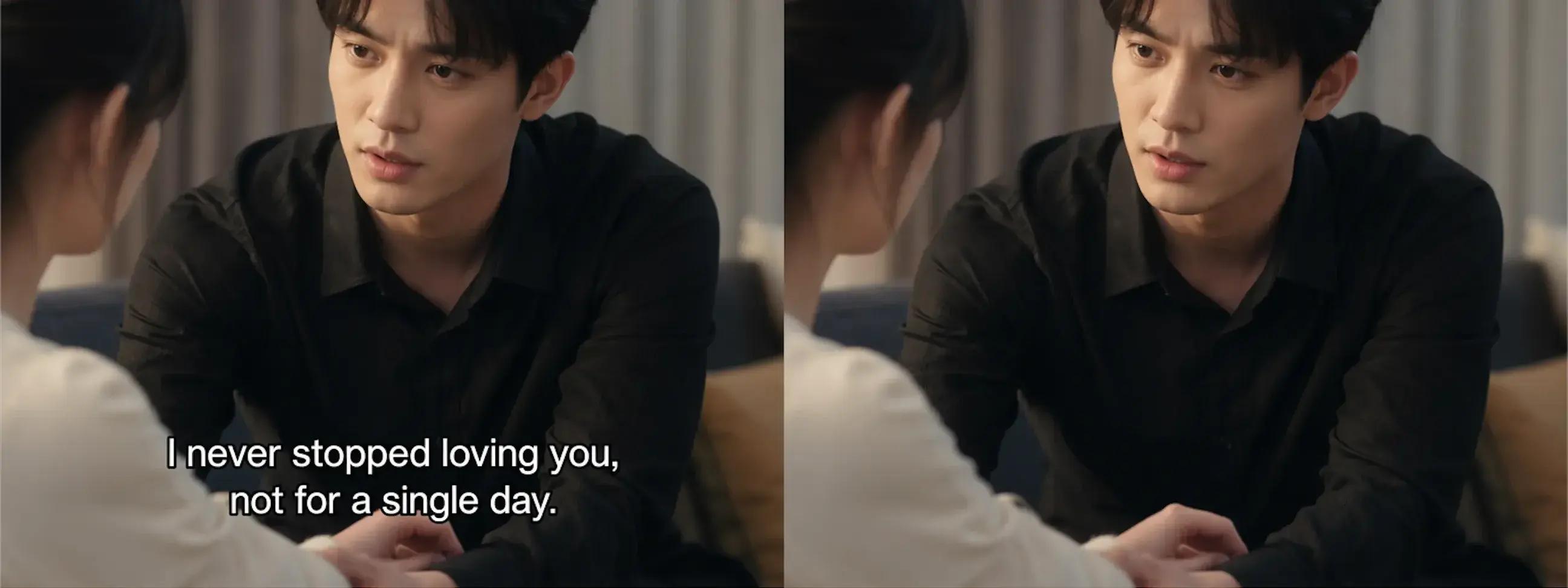
AI short dramas are everywhere — TikTok, Reels, Shorts, and dedicated drama apps. But there is one persistent problem: almost every AI-generated short drama ships with hardcoded subtitles burned directly into the video frames. Unlike soft subtitles you can toggle off, these are pixels — permanently rendered over the scene.
Whether you are localizing Chinese short dramas for English-speaking audiences, repurposing content across platforms, or cleaning up garbled AI-generated text, you need a way to remove subtitles from video without destroying the footage underneath. This guide walks through why AI short dramas have this problem, which methods actually work, and how to get clean results in minutes instead of hours.
Why AI Short Dramas Have Hardcoded Subtitles
Most AI video generators — including tools like Kling, Seedance, and similar platforms — automatically render subtitles onto the output. This is by design: short drama viewers often watch without sound, so burned-in captions maximize accessibility. But for content creators who want to remove subtitles from video for translation or repurposing, this creates a significant obstacle.
AI-Generated Subtitles vs Human-Placed
Human editors place subtitles in consistent positions with clean formatting. AI-generated subtitles are less predictable — they can appear at different vertical positions, use varying font sizes, and sometimes produce garbled or malformed text, especially when the model misinterprets dialogue. Tools like Seedance 2.0 and Happy Horse are known for occasionally rendering corrupted subtitle text that makes the video unusable without cleanup.
Why You Cannot Just Toggle Them Off
Hardcoded (or "burned-in") subtitles are rasterized into each frame as actual pixels. They are not a separate subtitle track you can disable in VLC or remove by deleting an .srt file. The subtitle text replaces the original background pixels permanently. To remove hardcoded subtitles from video, you need to reconstruct the missing background — which is exactly what AI inpainting does.


The Problem with Traditional Removal Methods
Before AI-powered tools existed, creators had three options for dealing with burned-in subtitles. Each comes with serious trade-offs, especially for short drama content shot in vertical (9:16) format.
Cropping Cuts the Story
Cropping the bottom of the frame removes the subtitles — but it also removes part of the scene. In vertical short dramas, this is especially destructive. You lose character expressions, important visual cues, and up to 25% of the frame. The remaining footage looks awkward when re-exported for different aspect ratios.
Blurring Leaves Visible Artifacts
Applying a Gaussian blur over the subtitle area hides the text but replaces it with an obvious blurry patch. Viewers notice immediately, and the result looks unprofessional. For content destined for commercial distribution or brand partnerships, this is unacceptable.
Manual Masking Takes Hours Per Episode
Tools like After Effects or Premiere Pro let you mask and content-aware fill each subtitle region frame by frame. For a 60-second clip at 30fps, that is 1,800 frames. Even with batch processing, a single episode can take 2-3 hours of skilled editing. Multiply that across a 20-episode series and the time investment becomes prohibitive.
How AI Subtitle Removal Actually Works
Modern AI subtitle remover tools use a three-stage pipeline to clean burned-in text from video frames:
Detection, Inpainting, and Reconstruction
First, the AI detects subtitle regions using optical character recognition and visual analysis. It identifies which pixels belong to text versus background. Second, the inpainting model reconstructs the hidden background using context from surrounding pixels, adjacent frames, and learned patterns. Third, the system applies this reconstruction across every frame with temporal consistency, ensuring the restored area does not flicker or shift between frames.
The result is a clean video where the subtitle text has been replaced with a plausible reconstruction of the original background — faces, clothing, scenery, and all.
What Makes Short Drama Subtitles Different
Short drama subtitles present unique challenges. They often appear over complex, changing backgrounds — characters moving, camera panning, dramatic lighting shifts. Unlike news broadcasts with a static lower-third bar, drama subtitles overlay faces, hands, and emotionally significant visuals. The AI must handle motion, partial occlusion, and varying background complexity all at once. This is why generic text removal tools often produce visible artifacts on drama footage, while purpose-built models maintain quality.


Step-by-Step: Remove Subtitles from Short Dramas
With UnmarkAI, removing hardcoded subtitles from AI short dramas takes three steps and a few minutes — no editing experience required.
Upload Your Video
Drag and drop your short drama clip into the upload area. UnmarkAI supports MP4, MOV, WEBM, AVI, and MKV formats up to 2GB and 60 minutes in length — more than enough for any short drama episode.
Select the Subtitle Region
Choose full-frame mode for automatic subtitle detection across the entire video, or use the box-select tool to target only the subtitle area. Box selection is faster for standard lower-third subtitles, while full-frame mode handles subtitles that appear at varying positions — common in AI-generated dramas.


Preview and Download the Clean Result
Before downloading, preview the cleaned video frame by frame to verify quality. The AI preserves original resolution, frame rate, and color fidelity. If the result looks good, download your clean video and move on to the next episode. You can also process up to 4 videos concurrently to speed through an entire series.
AI Short Dramas That Benefit from Subtitle Removal
Removing subtitles from AI short dramas opens up several high-value workflows that content teams use every day.
Localization for Global Markets
Chinese short dramas (短剧) are booming globally, but the hardcoded Chinese subtitles prevent direct distribution to English, Spanish, or Arabic-speaking audiences. Remove the original subtitles, then add new captions in the target language. This localization pipeline is how top distribution agencies repurpose drama content across markets.
Multi-Platform Content Repurposing
A short drama produced for Douyin (Chinese TikTok) with hardcoded Chinese subtitles cannot simply be uploaded to Instagram Reels or YouTube Shorts. The subtitles are meaningless to non-Chinese viewers. Removing them gives you a clean base that you can brand and caption for each platform individually.
Repairing Garbled AI-Generated Text
AI video generators like Seedance 2.0, Kling, and similar tools sometimes produce corrupted, garbled, or nonsensical subtitle text. These burned-in errors make the video look broken and unprofessional. AI subtitle removal cleans up the garbled text and restores the underlying footage, making the video usable again without re-generating the entire clip.
Comparison: Which Method Works Best?
Here is how the main approaches compare for removing subtitles from short drama footage:
AI Inpainting (UnmarkAI): Best quality. Reconstructs background, no cropping or blurring, processes in minutes. Free trial available.
Cropping: Fastest but loses 15-25% of the frame. Unusable for vertical short dramas where every pixel counts.
Blurring: Quick but leaves an obvious blurry band across the video. Not suitable for professional or commercial content.
Manual Editing (After Effects / Premiere Pro): Highest control but requires 2-3 hours per minute of footage and advanced editing skills.
For short drama workflows where speed, quality, and volume all matter, AI inpainting is the clear winner. You get clean results at original resolution without the time investment of manual editing or the quality compromises of cropping and blurring.
Tips for Best Results on Short Drama Footage
Start with the highest quality source you have. AI inpainting performs significantly better on 1080p or higher resolution footage than on heavily compressed exports. If possible, use the original file from your AI video generator rather than a re-compressed version downloaded from social media.
Use box-select mode when subtitles are consistently positioned in a lower-third area. This focuses the AI processing on the subtitle region only, resulting in faster processing and cleaner output. Switch to full-frame mode when subtitles move around or appear at multiple positions throughout the video.
For batch processing a multi-episode series, use the concurrent processing feature to handle up to 4 episodes simultaneously. Test on one episode first to verify quality settings, then queue the rest. Check out our guide on how to batch remove subtitles from video for detailed batch workflows.
FAQ
Can AI remove subtitles from any language?
Yes. AI subtitle removal works by detecting visual text patterns, not by reading specific languages. It handles Chinese, English, Arabic, Spanish, Japanese, Korean, and any other script equally well. The AI analyzes pixel patterns and reconstructs background regardless of the language of the subtitle text.
Does subtitle removal work on vertical (9:16) short dramas?
Absolutely. Vertical video is the primary format for short dramas on TikTok, Reels, and Shorts. AI inpainting handles 9:16 footage the same way as horizontal video — no cropping required, and the full frame is preserved.
How long does it take to remove subtitles from a 1-minute clip?
Most 1-minute clips process in under 3 minutes with AI inpainting. Processing time depends on resolution, frame rate, and the complexity of the background behind the subtitles. Vertical 1080p short drama clips typically process in 1-2 minutes.
Is it legal to remove subtitles from videos?
Removing subtitles from videos you own or have rights to modify is perfectly legal. Common authorized use cases include cleaning up your own AI-generated content, localizing content you have distribution rights for, and removing corrupted text from your own footage. Always ensure you have the right to modify the video before processing.
Will the quality decrease after subtitle removal?
No. AI subtitle removal preserves the original resolution, frame rate, and color profile. The output video matches the input quality — only the subtitle text is removed and the background is reconstructed.
Hardcoded subtitles do not have to be permanent. Whether you are localizing Chinese short dramas for new markets, fixing garbled AI-generated text, or repurposing content across platforms, AI-powered subtitle removal gives you clean, professional results in minutes. Try it free — upload your first short drama clip and see the difference for yourself.