AI 抖音去水印

抖音视频去水印在线工具 - 高清不模糊

上传视频

拖拽文件到这里,或点击浏览

视频会被安全处理,不会被公开分享

MP4、MOV、AVI、MKV、WebM · 最大 2GB

查看前后对比

处理前TikTok video with a watermark before AI removal - UnmarkAI
处理后TikTok video after AI watermark removal - UnmarkAI

用 AI 清理抖音视频里的跳动 Logo、用户名水印和角标,不裁剪画面,不用模糊遮盖。

UnmarkAI 适合处理你自己创作或已获授权的抖音视频。直接上传文件,AI 会逐帧识别水印区域并重建背景,便于发布到小红书、抖音、Reels、Shorts 或广告素材库。

适合创作者的抖音去水印流程

很多创作者会把同一条短视频分发到多个平台。相比裁剪或打码,AI 去水印能尽量保留原构图和清晰度,更适合二次剪辑和跨平台发布。

  • Works on deleted or private TikTok videos
  • No need to copy-paste links or URLs
  • Perfect for cleaning your own saved backups
  • AI tracks the bouncing logo better than blur tools

抖音视频怎么去水印?

上传你有权编辑的视频,AI 自动检测移动水印,预览效果后下载干净版本。

01

抖音视频怎么去水印?

上传你有权编辑的视频,AI 自动检测移动水印,预览效果后下载干净版本。

02

AI detects and removes the watermark

AI scans each frame, finds the bouncing TikTok logo and username, and reconstructs the covered pixels using the surrounding background. No manual selection required.

03

Preview and download

Compare the cleaned clip against the original, check edges and motion-heavy areas, then download a watermark-free export at the original resolution.

TikTok watermark removal results

See what AI inpainting can do. The TikTok logo and username are removed without cropping the frame or leaving a visible blur patch.
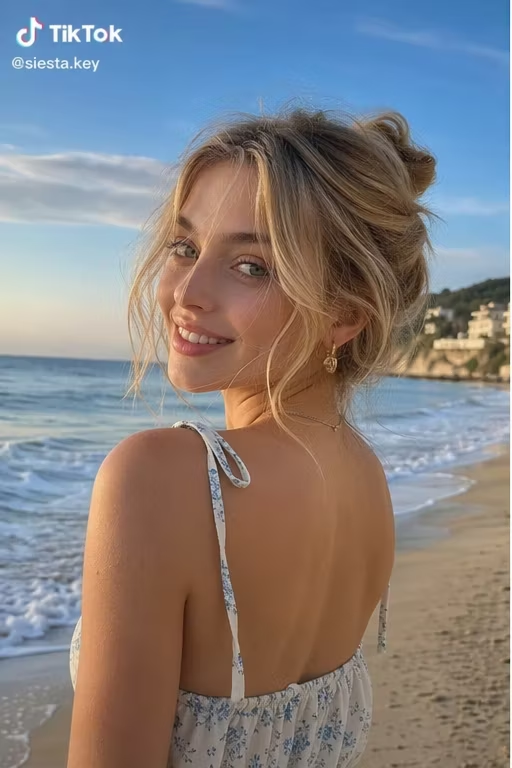

  • No blur or smudgeAI reconstructs the background behind the watermark pixel by pixel.
  • Full frame preservedNo cropping needed — the entire frame stays intact at the original resolution.
  • Handles animated logosThe bouncing TikTok watermark is tracked and removed across every frame automatically.
处理前Bouncing TikTok logo - before
处理后Bouncing TikTok logo - after
想要更干净的视频?AI 去水印,不模糊,不压画质。
免费试用
处理前TikTok username overlay - before
处理后TikTok username overlay - after
想要更干净的视频?AI 去水印,不模糊,不压画质。
免费试用

Authorized use only

TikTok watermark removal is legitimate when you are cleaning your own content or media you have explicit rights to edit. It is not meant for stripping attribution from third-party videos.

  • Original contentTikTok videos you created yourself, where you control all editing rights.
  • Licensed mediaStock or licensed clips where the license permits derivative edits and cleanup.
  • Cross-platform postingPosting your own TikTok content to Reels, Shorts, or ads without the platform watermark.
  • Client-approved editsVideos where the content owner gave written approval for the cleanup.

支持手机和电脑上的常见视频格式

支持 MP4、MOV、WebM 等常见格式。你可以从 iPhone 相册、Android 文件夹、Mac 或 Windows 浏览器上传已保存的视频。

  • Full HD (1080p) and 4K support
  • No quality loss or forced compression
  • Batch process multiple TikTok clips at once
  • Compatible with MP4, MOV, and AVI formats

面向跨平台发布的清理

清理自己的抖音原创内容后,可用于 Reels、Shorts、广告投放或品牌素材归档。请避免处理没有授权的第三方视频。

  • iOS/iPhone: Save directly to your Camera Roll
  • Android: Works in Chrome with direct gallery access
  • Desktop: Batch processing for Mac and Windows
  • No app download or registration required

去除抖音水印前先确认授权

只处理你拥有、已购买授权或得到明确许可的视频。未经允许去除他人内容的署名、水印或平台标识,可能违反版权、商标或平台规则。

  • Safe for your own original TikTok content
  • Get written permission before editing others' videos
  • Do not use this to steal or reupload third-party content
  • Review each platform's terms before cross-posting

为什么 AI 比裁剪和模糊更自然

裁剪会损失画面,模糊会留下明显痕迹。AI 会根据周围画面补全被水印遮挡的区域,适合移动水印和复杂背景。

  • No forced crop — keeps the original composition
  • No visible blur or smudge where the logo was
  • Tracks the bouncing watermark across all frames
  • Batch-friendly — queue multiple TikTok clips at once
可信流程

为有授权的视频清理而设计

UnmarkAI 面向创作者和团队,用于处理自己拥有、已授权或有权编辑的内容。产品文案、条款和上传流程都会强调这一边界。

重视版权和授权下载前可预览安全处理清晰的使用政策

常见问题

关于安全、高质量视频清理流程的实用解答。

可以在手机上去除抖音水印吗?

可以。用手机浏览器打开 UnmarkAI,上传相册里的抖音视频,处理完成后下载到本地即可。

How do I remove a TikTok watermark on iPhone or Android?

Simply open UnmarkAI in your mobile browser (Safari or Chrome), upload the TikTok video from your gallery or camera roll, and let the AI process it. Once finished, you can save the watermark-free video directly back to your device.

Why does my TikTok link not work in a downloader?

Most TikTok downloaders (like SnapTik) fail if the video has been deleted, set to private, or restricted by the creator. UnmarkAI solves this by cleaning the video file itself. If you have the video saved, our AI can remove the watermark even if the original link is broken.

Will removing the watermark reduce video quality?

No. Unlike basic editors that use blurring or cropping, UnmarkAI uses AI inpainting to reconstruct pixels. This allows you to remove the TikTok logo while maintaining 1080p HD resolution and full-frame composition.

准备清理你的视频?

让视频少一点干扰,更适合发布、交付和复用。

立即免费开始

注册获得 10 个积分 · 无需付费